Software/ja
|
English • العربية • български • català • čeština • Deutsch • Ελληνικά • español • فارسی • français • hrvatski • magyar • italiano • română • 日本語 • 한국어 • lietuvių • Nederlands • norsk • polski • português • русский • Türkçe • українська • 中文(中国大陆) • 中文(台灣) • עברית • azərbaycanca • |
Contents
ソフトウェア
ソフトウェアのツールチェーンは、大きく3つの部分に分けられます:
- CADツール
- CAMツール
- 電子機器用ファームウェア
RepRapプロジェクトは自由ソフトウェアを推奨していますが、他の選択肢があることも認めています。
モデリング (CAD)
コンピュータ支援設計(Computer Aided Design, CAD)ツールは、印刷する3D部品を設計するために使用されます。
CADツールの本来の意味は、パラメータに基づいて部品を簡単に変更・操作できるように設計されていることです。CADファイルはしばしばパラメーター依存的なファイルと呼ばれます。通常、部品やアセンブリは空間領域構成法(Constructive Solid Geometry, CSG)によって表現されます。CSGでは、立方体、球体、円柱、ピラミッドなどの基本形状に対してブーリアン演算を行い、それを木構造として部品を表現します。
このカテゴリに入る自由/リブレ/オープンソースソフトウェア(FLOSS)のアプリケーションには、OpenSCAD、FreeCAD、HeeksCAD などがあります。プロプライエタリソフトウェアでCADツールの例としては、PTC Creo(旧 PTC Pro/Engineer)、Dassault Solidworks、Autodesk Inventor などがあります。
この種のプログラムでは、ジオメトリはフィーチャーツリーに格納され、寸法を数値的に変更でき、その後正確に再生成されます。ジオメトリは数学的な表現であり、例えば円は中心、半径、平面パラメータから生成されます(つまり「パラメトリック」)。どれだけズームインしても円は曲線であり、CADプログラムはクリックしたときにその中心を容易に認識できます。これは、円と同心円状に除去した図形の図面を作成する際に非常に有用です。
一方で、3Dポリゴンメッシュを用いたモデリングを採用しているソフトウェアもあります。これらのアプリケーションは特殊効果や芸術的用途に使われることが多く、ややユーザーフレンドリーな傾向もあります。FLOSSに属する例としては Blender や Art of Illusion があります。プロプライエタリソフトウェアとしては Autodesk 3ds Max、Autodesk Alias、SketchUp などが挙げられます。
さらに、ウェブブラウザだけで形状を作成できるサイトもあり、例えば | TinkerCAD.com(簡易)、| 3DTin.com(より高度)などがあり、生成されたジオメトリをダウンロードできます。
上記のいくつかのツールはパラメトリックデータを用いてジオメトリを生成しますが、多くはモデルを構成するポリゴンの頂点位置を記録するだけです。あるものはパラメータでジオメトリを生成しても、頂点が配置された時点でそのデータを破棄します。そのため、曲線は実際には点と点を結ぶ多数の直線から生成された近似に過ぎません。したがって、これらのツールは寸法の精度よりも外観や使いやすさが重視される設計に適しています。
もしできるだけ少ない材料で部品を印刷したい場合は、応力に応じて体積を最適化した設計が必要であり、トポロジー最適化を利用することができます。非商用限定ソフトウェアとしては Topostruct(sawapan.eu サイト参照)、BESO などがあり、自由オープンソースとしては |Topy(優秀な William Hunter によってPythonで書かれたトポロジー最適化ソフト)があります。
また、部品の支持構造を生成したり、部品内部を充填して材料を節約するためにラティス(格子)設計ソフトを使用するのも有用です。最もよく使われるものの1つは Materialize Magics ですが、Netfabb もあります。いずれも専有ソフトウェアで、無料ではありません。
ファイルフォーマット
ほとんどの場合、3D ソフトウェアアプリはアプリケーション固有の形式でファイルを保存します。プロプライエタリソフトの場合、その形式は頻繁に変更され、厳重に保護された企業秘密となっているのが一般的です。
互換性のある CAD ファイル形式は非常に限られています。最も広く使用されている 2 つの互換性のある CSG ファイル形式は STEP と IGES です。これらはいずれもパラメトリックデータからジオメトリを切り離し、「死んだ」ソリッドのみを提供します。フィーチャーを追加したり削除したりすることは可能ですが、基本形状は固定されています。現在のところ、パラメトリックデータを保持する業界共通のファイル形式は存在しません。
最も広く使われている互換性のあるメッシュファイル形式は STL です。STL ファイルは重要であり、その理由は後述しますが、CAM ツールで利用されるからです。
メッシュファイルはパラメトリックデータを含んでいないため、CSG ファイル形式に変換することはできません。含まれているのはソリッドボリュームを構成するポリゴンの頂点座標だけだからです。しかし、CSG ファイル形式をメッシュファイル形式に変換することは可能です。
したがって、部品を設計する場合は、CSG CAD アプリケーションを使って設計し、生成した STL ファイルとともにオリジナルのパラメトリックファイルを保存・配布するのが良い方法です。
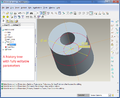
パラメトリックファイルフォーマット
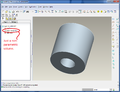
STEPエクスポートフォーマット
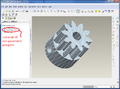
STLメッシュフォーマット


スライサー(CAM)
Computer Aided Manufacturing, or CAM, tools handle the intermediate step of translating CAD files into a machine-friendly format used by the RepRap's electronics. More info is on the CAM Toolchains page.
In order to turn a Design part into a machine friendly format, CAM software needs an STL file. The machine friendly format that is used for printing is called G-code. Early versions of RepRaps used a protocol called SNAP but industry standard G-codes are now used. To Convert STL files to G-code, you can use one of the following programs:
- MatterSlice (Fast and full featured - works with MatterControl)(open source)
- Skeinforge (Dated solution)(Still one of the best and highly recommended for accurate prints
- Cura (Also includes G-Code sender)(Extremely fast and accurate)
- Slic3r (Popular solution for most RepRappers)(Lots of bugs in every release)
- Kisslicer (Fast and accurate with very few bugs)(Closed source)
- RepSnapper
- RepRap Host Software
- X2sw
- SuperSkein
- SlicerCloud (Online Slic3r solution)
- Simplify3D (All-In-One Paid Suite)
- Cloud3Dprint (Slice your 3D files for over 150 supported printers or enter your own customized 3d printer parameter)
The STL to G-code conversion slices the part like salami, then looks at the cross section of each slice and figures out the path that the print head must travel in order to squirt out plastic, and calculates the amount of filament to feed through the extruder for the distance covered.
(Normally you don't need to repair, edit or manipulate STL files directly, but if you do, you might find the software at Useful Software Packages#Software for dealing with STL files useful).
G-code sender
To send the G-code files to a microcontroller's g-code interpreter, you need to either to:
- Load the G-code file on an memory card (typically SD card) if supported.
- Historically it was more common to Drip-feed the G-codes (usually a line at a time) over a serial port (RS-232 or TTL level, often used with a USB converter) or a direct USB connection using one of the following programs on your workstation, this has become more common again with the use of klipper
Some of the options are cross platform while others will only work with certain operating systems or prefer specific integrated firmware interpreters.
Machine Control
After you have your G-code file, you have to run it through a G-code interpreter. This reads each line of the file and sends the actual electronic signals to the motors to tell the RepRap how to move. There are two main ways to run a G-code interpreter:
1) The most common way is to interpret G-code in the firmware of a microcontroller. Typically, the microcontroller is AVR-based which is what's used in the Arduino. In order to transfer the g-codes to the microcontroller, you need a way to send the g-code to the microcontroller. See below for more details.
2) The alternate way is to interpret G-code using software that runs on a multi-purpose O/S such as linux. Two examples are EMC and Redeem. With these types of interpreters, THERE IS NO GCODE SENDER. The operating system communicates directly with special hardware that controls the motor signals. For EMC, it typically uses the computer's parallel port. For Redeem, it uses the PRU built into the Texas Instruments ARM CPU on the Beaglebone Black.
G-codes
After your microcontroller has its firmware loaded, it is ready to accept G-codes via the software-emulated RS-232 serial port (aka COM port). This port shows up when you plug in your arduino to the PC via USB. You can either use a program to send these G-codes over the serial port or you can type them in by hand if you fire up a plain-old terminal application like hyperterm or minicom. If you use a program, they generally take files in gcode format.
For all available firmwares see List of Firmware. The following is a brief list of the most popular firmware:
Firmware
The firmware files are usually packaged as source code for an Arduino IDE project. Arduino source code consists of a bunch of PDE (or as of Arduino ver 1.0, INO) files along with some extra .cpp and .h files thrown in. The Arduino IDE compiles the source code into a single .hexfile. When you click on the upload icon in the Arduino IDE, it uploades the .hex file to the electronics.


